Integrating Legacy Intercom with Home Assistant
← All postsMy home has an old intercom system, and I wanted to modernize it by integrating it with Home Assistant. The main goal was to get notifications when someone rang the intercom, especially when we were in the backyard and couldn't hear the chime. Since I already had the gate's lock integrated with HA, I saw an opportunity to take things a step further.
Step 1: Connecting the Intercom to Home Assistant
The first challenge was making HA detect when the intercom button was pressed. Since my intercom is quite old, it doesn’t have any smart connectivity. However, there was some old cabling running from the intercom to the attic, where my Raspberry Pi running HA is located. I decided to use it, though an ESP32 could have worked as well.
In my setup, when the outer intercom button is pressed, the circuit closes and a sound signal is emitted through the internal speaker. I hooked up my RPi GPIOs to this circuit in parallel. I used an optocoupler to keep the intercom and RPi isolated, along with a capacitor and a diode to stabilize the signal.
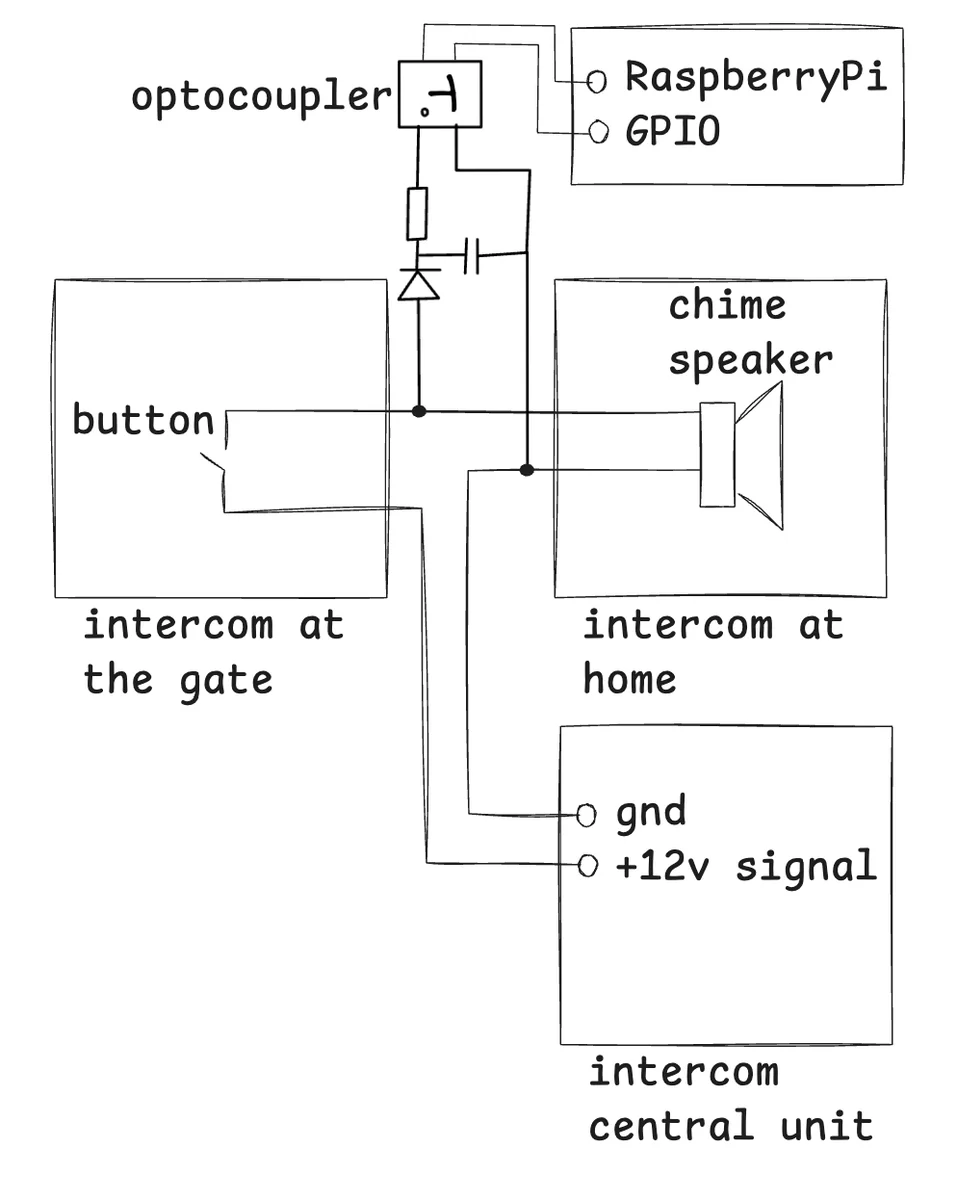
Then I used the Raspberry Pi Remote GPIO integration to expose the GPIO in HA. This created a new entity, binary_sensor.wywolanie_domofonu, which changes state each time the button is pressed. The last step was building a simple automation to send phone notifications when the button is pressed.
Step 2: Automating the Gate Lock with Morse Code
With the intercom connected to HA, I realized I could take automation a step further. Since I had already integrated my gate’s lock with HA, I thought, why not allow specific ring patterns to trigger the gate to unlock automatically?
To accomplish this, I set up a Morse code system. If someone rings the intercom button in a specific pattern (for example, .-.- for AA), HA recognizes it and unlocks the gate. This feature has been particularly handy for my kids when they return from school — they no longer need a key to enter. And by hearing the pattern in the internal intercom's speaker I can easily distinguish open attempt from an actual call.
To set it up I used HA Python Scripts feature, which exposes scripts located in <config>/python_scripts/ as actions that can be used in automations.
Here's the automation setup:
alias: Open the gate using morse code
triggers:
  - entity_id:
      - binary_sensor.wywolanie_domofonu
    trigger: state
conditions:
  - condition: template
    # We give five seconds to enter the code.
    # The automation won't be triggered for 5 secs after initial call.
    # Subsequent button pushes will be handled by the script
    value_template: >-
      {{ (as_timestamp(now()) - as_timestamp(state_attr('automation.gate_morse',
      'last_triggered') | default(0)) | int > 5)}}
    enabled: true
actions:
  - data: {}
    action: python_script.gate_morse
mode: single
And python script gate_morse.py:
# Sensor to read data from
SENSOR = "binary_sensor.wywolanie_domofonu"
# Switch to trigger on correct pattern
SWITCH = "switch.furtka_on_off"
# We can have multiple codes. Each code is a list of booleans.
# True means a long signal, False means a short signal.
# For example to encode ".-.-" we need [False, True, False, True]
CODES = [
    [False, True, False, True]
]
# time to enter the code; should be identical as in automation
TIME_WINDOW_SEC = 5

ON = "on"
OFF = "off"
RANGE_DELIM = 20
RESOLUTION = 0.02


def calculate_pattern(states: list[str]) -> list[bool]:
    counter = 0
    collected = []
    for entry in states:
        if entry == ON:
            counter = counter + 1
        else:
            if counter:
                collected.append(counter)
            counter = 0
    if counter:
        collected.append(counter)
    logger.info(collected)
    return [i > RANGE_DELIM for i in collected]

start = time.time()
states = []
while time.time() - start < TIME_WINDOW_SEC:
    states.append(hass.states.get(SENSOR).state)
    time.sleep(RESOLUTION)
received_pattern = calculate_pattern(states)
passed = received_pattern in CODES
logger.info(f"{'OK' if passed else 'FAILED'}, Range: {RANGE_DELIM} recv: {received_pattern}, expected: {CODES}")
if passed:
    hass.services.call("switch", "toggle", {"entity_id": SWITCH}, False)
Final Thoughts
Why bother and not just buy a new wifi intercom with a keypad?
- It's not that fun
- My legacy system is much simpler and easier to tinker with, so I don't want to replace it
- It looks old, so it does not attract attention from the outside
- Very cost-savvy
Hope you enjoyed. Happy tinkering!